ISF filing automation reduces a 20-to-30-minute manual process to seconds of review by replacing data entry with AI extraction. An ISF, or Importer Security Filing, is the 10+2 data set that U.S. Customs and Border Protection requires to be submitted at least 24 hours before a vessel loads at the foreign port of lading, under 19 CFR Part 149. Manual ISF filing at a freight forwarding operation follows a predictable chain: receive a booking email, locate the ISF worksheet, key each of the 10 required data elements into the portal, look up HTS codes against prior filings, confirm consolidator and stuffing location addresses, and submit. At 40 to 80 ISF filings per month, that manual chain consumes 13 to 40 hours of ops time. TIO’s ISF agent reads every inbound email and attachment, extracts all 10+2 fields, cross-references them against the consignee’s filing history, and hands your team a complete draft to review and submit. ISF prep is one job handled by TIO’s AI agent workforce for freight forwarders.
What is ISF 10+2 and why does manual filing take 20 to 30 minutes per shipment?
ISF 10+2 is the Importer Security Filing mandated by CBP under the SAFE Port Act of 2006, requiring 10 data elements from the importer and 2 from the ocean carrier for every U.S.-bound ocean shipment. The 10 importer elements are: Importer of Record, Consignee, Seller, Buyer, Ship-to Party, Manufacturer or Supplier, Country of Origin, Commodity HTS-6 Code, Container Stuffing Location, and Consolidator. The 2 carrier elements are Vessel Name and Voyage Number.
Manual filing takes 20 to 30 minutes per shipment because the data is split across formats that do not talk to each other. The booking confirmation email has the carrier elements. The overseas agent’s ISF worksheet, almost always an Excel file, carries the party data and stuffing location. HTS codes come from the packing list. Container details are in the draft bill of lading. A team member reads all four, locates each field, keys it into the portal, and cross-checks HTS codes before submitting. At 60 filings per month at 25 minutes each, that is 25 hours of ops time monthly.
The failure modes compound. A digit transposition on an HTS-6 code. A stuffing location defaulted to the manufacturer’s address because the actual facility was not specified in the worksheet. A consolidator address not updated after the shipper changed logistics providers. Each one is a deficiency CBP can act on. The filing window of 24 hours before vessel loading does not leave room for re-work.
| Manual ISF Process | TIO ISF Agent |
|---|---|
| 20-30 minutes per filing | Seconds of read-and-prefill, then a quick review |
| Team member reads multiple documents | Agent reads all documents in one pass |
| Manual HTS code lookup and verification | Automated cross-reference against prior filings |
| Every field keyed into the portal by hand | Draft prepared for review, no manual keying |
| Status checked manually in portal | AMS and CBP alerts sent automatically |
| Human error rate rises under time pressure | Validation runs on every filing, every time |
How does TIO extract the 10+2 data elements from email and attachments?
TIO reads labeled fields and their values regardless of layout, template, or document type. When an ISF worksheet arrives as an Excel file, a PDF, or a Word document embedded in an email thread, TIO locates each of the 10+2 fields by label rather than position. This means the reader handles worksheets from different overseas agents and template formats without manual reconfiguration for each layout.
The agent extracts from every document type in the same pass:
- Excel ISF worksheets (the most common format from overseas agents)
- PDF bills of lading (carrier elements, container numbers, sailing data)
- Word documents (party data and booking terms)
- Email body text (vessel, ETD, and booking confirmations)
After extraction, TIO validates the result against two sources. First, prior filing history for the consignee: every ISF filing TIO has processed for a given importer builds a profile covering typical HTS codes by commodity description, regular consolidators, stuffing location patterns, and party name variants. A new shipment for an existing consignee pre-fills quickly and cleanly from the first filing. Second, party data matching confirms that the consignee, manufacturer, and party data align with the filing’s requirements before the draft is assembled.
Every extracted field retains a provenance trail showing the source document and the specific cell or labeled section it came from. A reviewer verifying the draft can confirm the source in seconds rather than re-reading the original worksheet.
What happens when a freight forwarder emails TIO to prep an ISF?
The email-native workflow removes the manual data entry from the process.
-
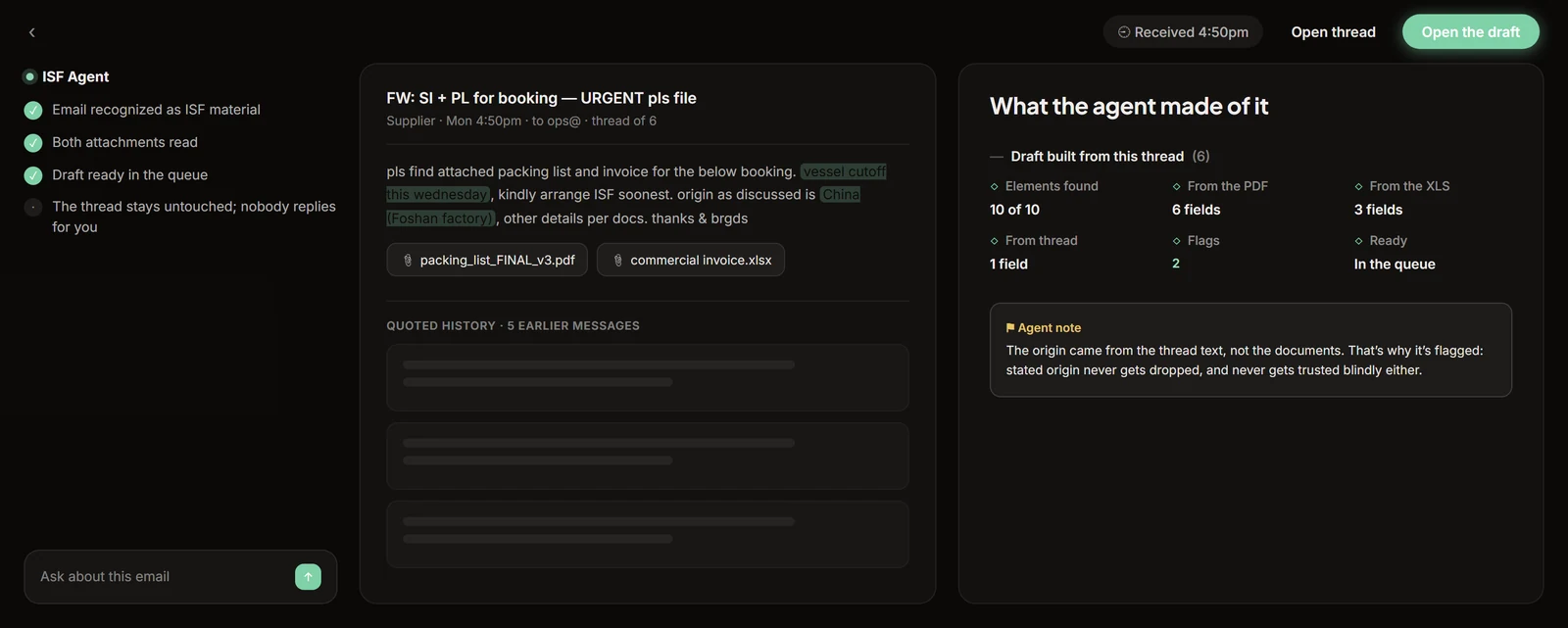
The team member receives a booking confirmation from the overseas agent with an ISF worksheet attached, or party data embedded in the email body. They forward it to TIO: “Please prep this ISF.”
-
TIO reads the email body and every attachment, extracts all 10+2 fields, and matches the consignee against prior filing history. Common flags: a new consignee with no filing history, an HTS code outside the consignee’s historical range, a missing consolidator address, or a vessel-and-voyage pair that does not match the booking data.
-
TIO returns an email within seconds:
“ISF draft ready. [Consignee name], MBL [number], ETD [date]. All 10+2 fields populated. HTS-6 matches prior filing for this consignee. Consolidator address confirmed. Review the attached draft and submit when it looks right.”
The team member reviews in the same email thread, checks each flagged field, and submits the filing by hand. TIO does not submit on its own.
- Once the filing is in, TIO monitors it and sends an alert when AMS matching and CBP acceptance are confirmed. If a filing does not clear by end of day, TIO sends a specific follow-up.
The full sequence from forwarded email to a reviewed, submitted filing takes a couple of minutes, and most of that is the person’s review, not the machine’s read. The read-and-prefill step itself finishes in under 30 seconds.
How does human-in-the-loop ISF filing work in practice?
There is one operating model, and a human is in the loop on every filing. TIO completes the extraction and validation, assembles the draft, and presents it for review before anything is submitted. The reviewer sees the completed 10+2 data set, the source documents, and any flags the agent raised. They confirm or correct, then submit the filing themselves. Manual data entry is gone. The team stays fully in control of what gets filed.
The agent is built to fail toward review, not away from it. When it is not confident, it says so and marks the field. Triggers for a flag include a first-time consignee, an HTS deviation from the historical range, a consolidator address not seen before, or a vessel-and-voyage mismatch. The reviewer decides what to do with each one.
Most teams find that after 30 to 60 days, the agent’s drafts on their regular consignees need almost no correction, so the review becomes a fast scan rather than a rebuild. The review still happens on every filing. What changes is how long it takes, not whether it occurs.
One note on regulatory accountability: TIO handles the data extraction, validation, and draft preparation. The registered ISF filer of record under CBP’s rules remains your team or your licensed customs broker, and that filer reviews and submits every ISF. TIO handles the preparation. Your team handles every call that requires a judgment, and your team files.
How does TIO track AMS match and CBP acceptance after filing?
After submission, two events still need to clear. AMS matching confirms the vessel’s manifest data aligns with the ISF data elements. CBP acceptance confirms the filing processed without a hold or exam flag. Both need to clear before cargo loads.
TIO monitors every ISF filing post-submission and sends alerts in one of two configurations.
Per-lot alerts fire as each filing clears AMS matching and CBP acceptance:
“ISF for [consignee], MBL [number]: AMS matched. CBP accepted. No action required.”
The daily digest is a single morning summary of all filings from the prior day with their current status. Matched filings show clear. Outstanding filings show hours pending.
If a filing has not achieved AMS match or CBP acceptance by end of business, TIO sends a specific alert:
“ISF for [consignee], MBL [number]: AMS match pending as of [time], [hours] outstanding. Recommended action: verify vessel and voyage data against the carrier’s manifest and confirm filing status in the portal. Escalate to your customs broker if CBP review is indicated.”
No filing falls through without a flag. The team stops managing a checklist and starts responding to exceptions.
What time savings does ISF automation deliver in practice?
One freight forwarding operation tracked ISF filing time before and after TIO. Manual filing averaged 20 to 30 minutes per shipment: locating the worksheet, keying each field, cross-referencing HTS codes, confirming party addresses, and submitting. At their volume, ISF preparation consumed multiple hours of ops time each week, not counting the time spent manually checking portal status for AMS and CBP confirmation.
After TIO, the same team forwards the booking email and receives a draft back within seconds. For filings on repeat consignees with confirmed commodity profiles, TIO pre-populates all 10+2 fields, and the operator’s job becomes review instead of entry. The operator scans the draft, confirms the flagged fields, and submits in under a minute. The twenty-five minutes of assembly is off their plate. The two minutes of judgment, mostly on the HTS field, stays with them.
The less visible cost of manual filing is unreliability. The filing delayed because someone was on a customer call. The HTS code transposed at the end of a heavy Friday. The consolidator address left unchanged after the shipper moved facilities six months ago. Each one is a miss on the importer’s record. ISF has a 24-hour window and no second chances.
ISF prep is one job handled by TIO’s AI agent workforce for freight forwarders. The same platform that handles ISF extraction, validation, and post-filing monitoring also reads every inbound email, binds it to the right job, extracts booking and document data, tracks carrier movements, and pre-fills your TMS records for ops review. The inbox-to-TMS intelligence layer handles the preparation. Your team makes every decision, and your team files.
If ISF prep is eating your team’s time, book a demo to walk through how TIO handles it. We will show you the extraction, the review workflow, and the AMS and CBP alert setup on your actual filing volume.
Frequently asked questions
How does AI automate ISF 10+2 filing for freight forwarders?
AI ISF automation works by reading inbound emails and attachments to extract all 10 required data elements: Importer of Record, Consignee, Seller, Buyer, Ship-to Party, Manufacturer or Supplier, Country of Origin, HTS-6 commodity code, Container Stuffing Location, and Consolidator, while the carrier files its own 2 elements separately (the vessel stow plan and container status messages). The agent validates each field against historical filing data for the same consignee, flags HTS code deviations from prior shipments, and prepares a complete draft in your ISF portal. A team member reviews every field and submits the filing. The agent handles the preparation; a person always reviews and files. The agent never submits on its own.
What happens when an ISF is late or inaccurate?
CBP treats a late filing (submitted fewer than 24 hours before vessel loading at the foreign port) and an inaccurate data element as separate deficiencies under 19 CFR Part 149, so one shipment can carry more than one. The consequences land on the importer of record and its ISF bond, and CBP can hold the container for exam or issue a do-not-load order at origin. For the forwarder the cost is operational: an exam or a hold delays the shipment, and a correction after lading takes far longer to unwind than the original entry took.
Can a freight forwarder prepare ISF filings by email instead of keying them into a portal?
Yes. TIO's ISF agent is built for email-native interaction. A team member forwards the booking email or ISF worksheet to the agent with a plain instruction such as 'Please prep this ISF.' The agent reads the email body and all attachments, extracts the 10+2 data elements, validates them against the consignee's prior filing history, and prepares a complete draft. The team member reviews the prepared draft, confirms the fields, and submits the filing. No manual field-by-field keying into the portal, and human review on every filing.
How does TIO validate HTS codes during ISF filing?
TIO maintains a filing history for each consignee and cross-references the HTS-6 code on the current shipment against codes filed for the same commodity profile in prior shipments. If the current code deviates from the historical pattern, the agent flags it before the draft goes for review. This catches common errors: a digit transposition on a 6-digit code, a commodity filed under a heading used for a different product line, or a country-of-origin mismatch that would change the correct heading. The agent does not replace a licensed customs broker's tariff classification judgment; it surfaces deviations for a person to review before submission.