ISF data is late, incomplete, and in forty different formats.
The ISF agent reads whatever the shipper sends, resolves the ten filing elements and the bill-of-lading identifiers, and drafts the ISF-10 for your team to review and submit.
The 10+2 is a deadline you hit by hand, every time.
Every filing pulls party details, HTS codes, and country of origin out of a worksheet that never looks the same twice, under a same-day clock. A missed or wrong element is a compliance problem. So a person keys it, checks it, and files it, over and over.
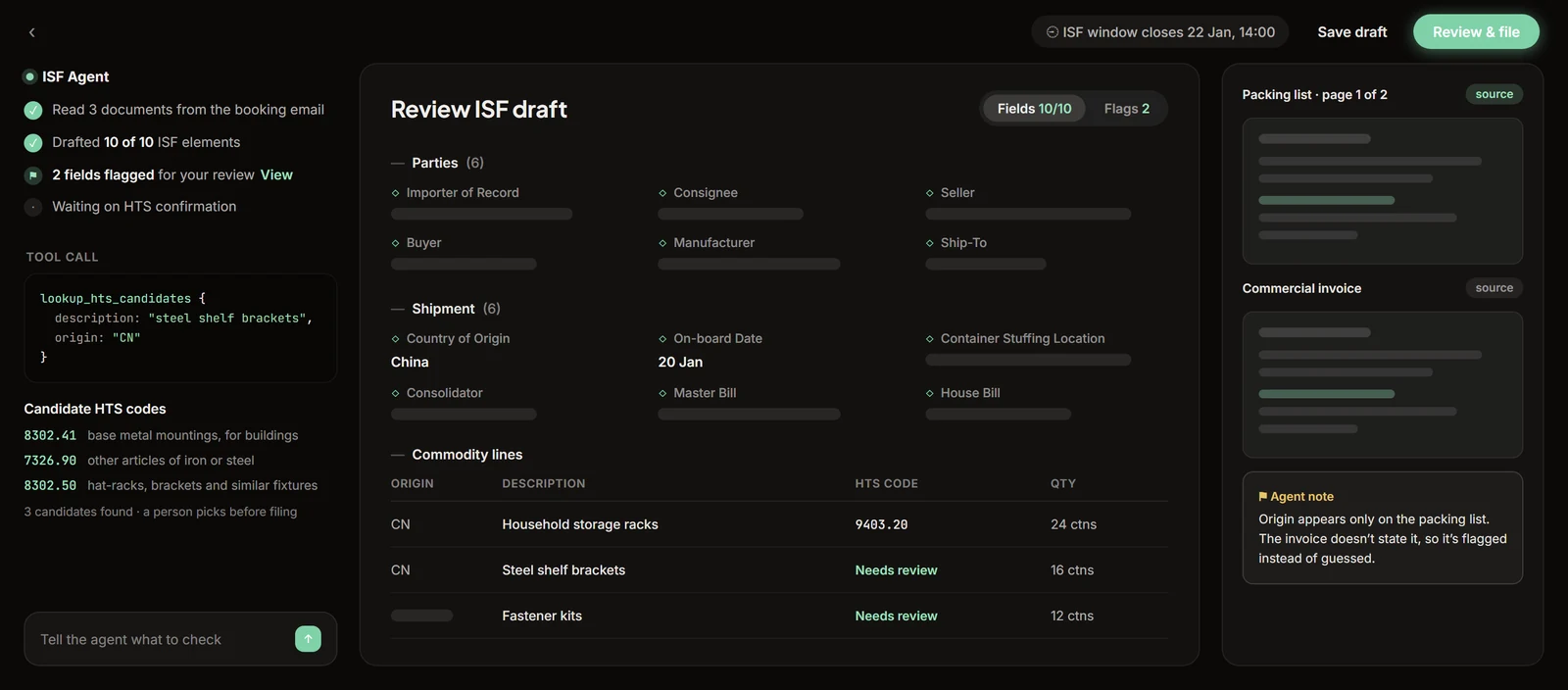
Drafted filing in seconds, submitted by a person.
Reads any worksheet
Whatever shape the 10+2 arrives in, including scanned PDFs. The agent works from the document, not a rigid template.
Resolves the elements
Seller, buyer, manufacturer, ship-to, consolidator, country of origin, HTS, plus the master and house bill identifiers.
Your filer submits
The agent drafts the ISF-10 into the filing portal. Your team reviews and files. Nothing submits on its own.
A standing audit re-checks every filing against what was actually filed, so drift shows up fast, in your own data.
Straight answers.
What does the ISF agent do with a worksheet?
It reads whatever the shipper or origin agent sends, in whatever format it arrives, and resolves the 10 importer filing elements plus the bill-of-lading identifiers into a drafted ISF-10. Your filer reviews and submits it. Prep that takes an operator about 15 minutes per filing is waiting as a draft in seconds.
Who actually files the ISF?
Your team does, every time. The agent stops at a drafted filing; the filer of record reviews and submits exactly as before, so responsibility sits where CBP already places it. Nothing is transmitted automatically. That matters because the filing goes out under your filer code and your bond.
ISF data arrives late and in forty formats. How does the agent cope?
By reading the way an operator reads, not by templates. Worksheets arrive as spreadsheets, PDFs, scans, and pasted email text, and the agent extracts the same 10+2 elements from each. When a required element is missing it flags the gap instead of guessing, so your team chases the shipper before the 24-hours-before-lading deadline instead of after.
Does this work if we are a broker handling filings for forwarders?
Yes. The agent drafts from whatever the forwarder or importer sends and stages the filing in your queue. Whether you file 20 ISFs a week or 200, the review step is the same: a person checks the draft against the source documents and submits. Corrections become rules the agent keeps per client.
See it on your own shipments.
Twenty minutes, no setup. Bring a real document and watch an agent take it to a finished draft while you’re on the call.
Book a demo