Freight forwarder back-office work is the data handling that happens between a shipment email arriving and that shipment existing as a clean record in your TMS. For a forwarder it is the single largest controllable time cost in the operation, and most of it is removable without adding people. The hours concentrate in one place: a person reading an email and re-typing its contents into the TMS by hand. That step costs 15 to 30 minutes per document set and repeats across the 4 to 6 emails each job generates, which at 100 jobs a month is a full working week of typing. At the US import forwarder measured in production, removing it returned roughly 17.5 hours a week to the team. That step, repeated across every job and every lane, is what this guide is about.
This is not a productivity-culture problem. The process usually works. It is accurate enough, the deadlines mostly get hit, and the team is competent. The problem is that it consumes operator time at a rate that scales linearly with shipment volume, and operator time is the most expensive and least elastic input a forwarder has.
What is freight forwarder back-office work?
Every shipment generates a stream of inbound documents from parties you do not control. The overseas agent sends a booking confirmation and a pre-alert. The carrier sends a bill of lading and, later, an arrival notice. The shipper sends a commercial invoice and a packing list. The trucker sends a delivery confirmation. Vendors send charge invoices. None of these arrive on a schedule and none of them land in your TMS. They land in an inbox.
Back-office work is the labor of turning that unstructured stream into structured records. Someone reads each message, decides which job it belongs to, extracts the fields that matter, and enters them into the system of record. Across ocean import, ocean export, air import, air export, domestic trucking, and sales quotes, every lane runs its own version of this loop.
The work is not glamorous and it is not optional. The TMS is authoritative, but the TMS does not read email. A human bridges the two. That bridge is where the hours go.
Where do the hours actually go?
It helps to walk the lifecycle of one ocean import job and watch where time accumulates.
A booking confirmation arrives. A team member opens it, identifies the carrier, vessel, ETD, and container, and notes the reference. The pre-alert follows with the commercial invoice and packing list attached. The same person opens each PDF, reads the shipper, consignee, manufacturer, country of origin, and HTS candidate, and reconciles any differences between the documents. They open the TMS, create the lot, and key every field in. Then they review what they entered and submit it.
For a clean, well-organized booking that sequence is unremarkable. For a messy one, with attachments in another language, a non-standard factory format, or a follow-up email needed to confirm the manufacturer, it runs much longer. Multiply either case by the number of jobs in a month and the cost becomes visible.
It is not just ocean import
Ocean import is the clearest example, but the same loop runs in every lane with different documents. Air import replaces the bill of lading with a master and house air waybill and compresses the timeline, so the transcription happens under more time pressure, not less. Ocean and air export invert the document flow but keep the same re-keying step. Domestic trucking trades the pre-alert for rate confirmations, dispatch sheets, and delivery receipts, and adds the work of chasing quotes and delivery information by email before anything reaches the TMS. Sales quotes are their own inbound stream feeding the same system. Each lane is a separate version of read, extract, re-type, and each one scales with its own volume.
The point is that the expensive part is not judgment. Deciding the correct HTS classification, catching a manufacturer-versus-trading-company ambiguity, or confirming a filer detail is judgment, and that is work worth paying a trained person for. The transcription around it is not. The two are currently bundled into one task, so the whole thing is priced at the cost of skilled labor.
What does the back-office time actually cost?
Here is the arithmetic, using the figures from the US freight forwarder case study. That operation runs close to 200 shipments a month.
Before automation, the email-to-TMS step took roughly 45 to 90 minutes per job depending on how clean the documents were. With the data-entry step automated and the team reviewing a pre-filled record instead, the same step took 8 to 12 minutes per job. The realized result was nearly 20 hours per week returned, per staff member. Source: TIO customer case study, 2026.
Walk it forward. Two hundred jobs a month is roughly nine to ten jobs every working day spread across the back-office team. At the low end of the manual range that is several hours of pure transcription daily. At the high end it is most of a person. The work does not disappear in slow weeks and it spikes in peak weeks, which is when the team has the least slack to absorb it.
Clean jobs versus messy jobs
The average hides the real problem, which is variance. A clean booking from a regular agent in a familiar format sits at the low end of the range. A messy one sits at the high end: attachments in another language, a factory using a non-standard layout, a commercial invoice that disagrees with the packing list on quantity, or a manufacturer that has to be confirmed by a follow-up email before the filing can proceed. Messy jobs are not rare and they are not predictable, so a team sized for the average is underwater whenever a cluster of hard jobs lands in the same week. Peak season is precisely when the mix shifts toward messy and when the team has the least slack to absorb it. Cutting the average per-job time also compresses that variance, which is the part that actually breaks weeks.
The reason this matters more than a generic efficiency saving is the shape of the cost curve. Manual back-office time scales one-to-one with volume. Win a bigger client and the data-entry hours grow in proportion. The thing that should create operating leverage, more shipments, instead creates more transcription. Cutting the per-job time is the only move that breaks that linear relationship.
What are the ways teams attack it?
Most forwarders have tried at least one of the following. They are not equivalent.
| Approach | Time per job | Consistency | Audit trail | Scales with volume |
|---|---|---|---|---|
| Manual entry (status quo) | 45 to 90 min | Varies by person and day | Buried in email threads | Linearly, the wrong way |
| Offshore BPO | Lower labor rate, same step | Varies by shift and training | Vendor-dependent | Still linear |
| Single-point AI tool | One task faster | High for that one task | Partial, that task only | Only the one step |
| AI back-office automation | 8 to 12 min review | Same rules every job | Immutable, exportable | Sub-linear |
Manual entry is the default and its real problem is the cost curve described above. Offshore BPO lowers the labor rate but does not remove the step, the timezone latency, or the variance, and it puts your shipment data in a third party’s hands. A single-point AI tool that only writes a quote or only extracts one field speeds up one step and leaves your team stitching the rest of the workflow together by hand. Full back-office automation removes the transcription across the whole job while keeping your team on the judgment.
None of these is a people-replacement argument. The team still owns the decisions. The question is only what the team spends its hours on.
How do you audit your own back-office hours?
Before changing anything, measure the thing you are trying to cut. This takes about a week and costs nothing.
- Pick one lane with steady volume, ocean import is usually the clearest, and one week.
- For every job that week, have the owner note the wall-clock minutes from “email opened” to “lot submitted in TMS,” including the document reading and the reconciliation.
- Tag each job clean or messy, where messy means a follow-up email was needed or a document conflicted.
- Sum the minutes and divide by the number of jobs to get a true per-job average, then split it by clean versus messy.
- Multiply the average by your monthly job count for that lane, then across lanes, to get monthly back-office hours.
- Divide by your back-office headcount to get hours per person per week, and compare that to what you are paying those people to do.
The number is almost always larger than the team’s estimate, because the work is distributed across the day in small increments and never shows up as a single block anyone notices.
Does adding headcount fix it?
The instinct when the back office is underwater is to add a person. It is worth being honest about why that does not solve it.
Adding headcount lowers the load per person once, then resumes climbing at the same slope. You have not changed the cost curve, you have only moved its starting point down and added a permanent salary plus the training overhead to absorb your SOPs. The next growth in volume puts you back where you started, now with a larger fixed cost base.
The same logic applies to outsourcing the step. The rate per hour falls, the slope of the curve does not. Anything that keeps a human transcribing email into the TMS, in-house or offshore, leaves the linear relationship between volume and hours intact. The only structural fix is to remove the transcription itself and keep the human on the part that needs a human.
What changes when the inbox stops being the operating layer?
The fix is not a faster typist. It is to stop treating the inbox as the place work happens and treat it as a structured input queue.
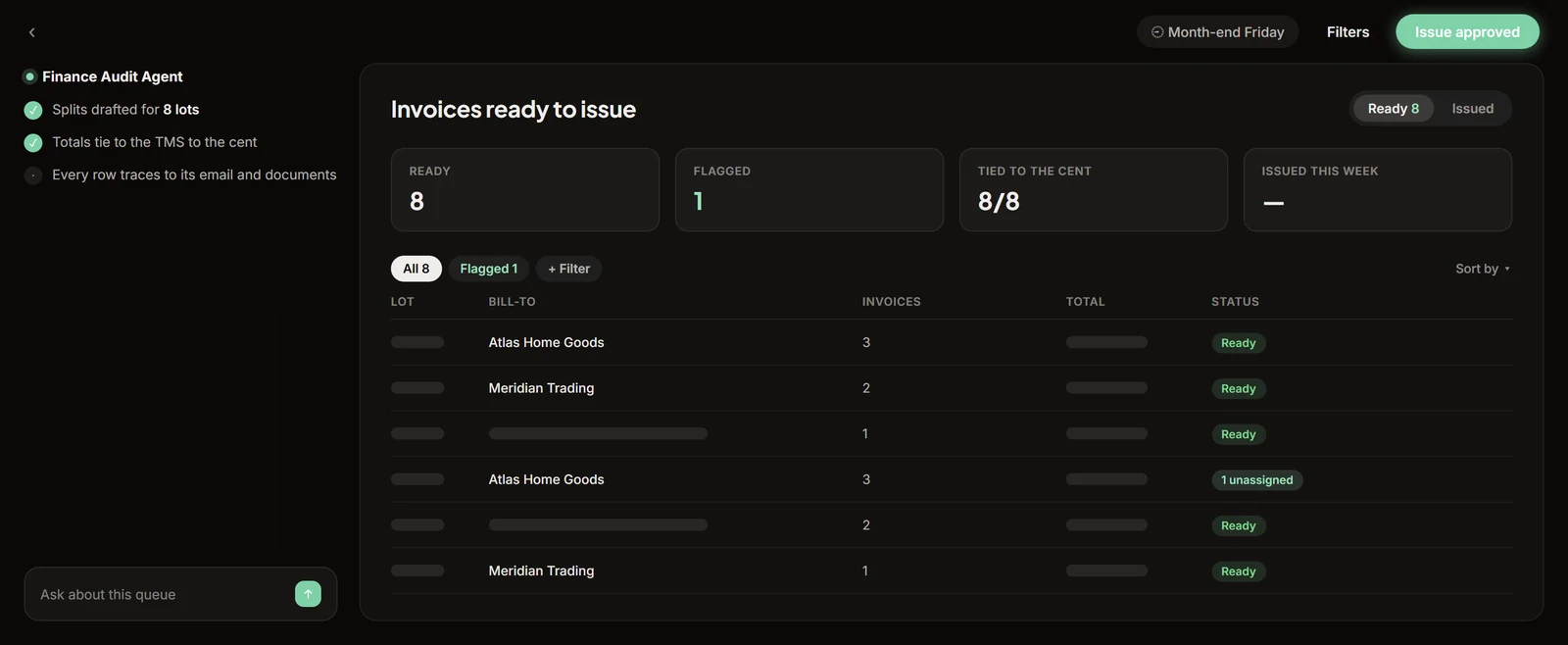
In practice that means software reads every inbound email, binds it to the correct job across every lane, extracts the fields, and pre-fills the record. Your team stops transcribing and starts reviewing. They open a pre-filled lot, check each field against its confidence score and source text, correct anything flagged, and approve. The approved data writes to your TMS through its API. The TMS stays the system of record. Nothing reaches it without a person approving it.
This is the model TIO runs in production for forwarders today. It is built for exactly the operation described in this guide: a 5 to 50 person team where the bottleneck is email-to-TMS data entry across multiple lanes. The compliance posture does not change. For customs filings the filer of record reviews and submits exactly as before. There is no path that reaches the TMS or CBP autonomously. The deadline math also does not change: an ISF still has to be filed no later than 24 hours before the cargo is laden aboard the vessel under CBP’s rule at 19 CFR Part 149. What changes is that the data behind that filing is pre-filled and queued for review in minutes instead of transcribed by hand in an hour.
The compliance posture does not change
This is the part operators are right to be skeptical about, so it is worth being precise. Removing the transcription does not remove the review. For any customs filing, the filer of record reviews every extracted field, with its confidence score and the source text it came from, and submits exactly as they do today. Low-confidence fields, the classic example being a manufacturer-versus-trading-company ambiguity or an uncertain HTS candidate, are flagged rather than buried, so the reviewer spends their time on the fields that need a decision instead of re-typing the fields that do not. Every state change is logged: email received, extraction run, field edited, approved, written. The audit trail is immutable and exportable, which makes the process easier to defend to a customer or an auditor than a chain of forwarded emails ever was. Nothing about who is responsible for the filing changes.
The outcome is the one in the case study. The per-job time collapses from the 45-to-90-minute manual range to an 8-to-12-minute review, and the operator hours that were going to transcription, nearly 20 a week per staff member, go back to moving freight. The cost curve bends. More volume no longer means proportionally more typing.
Where do you start?
If you run a forwarder back office, do the audit in the section above first. You cannot manage what you have not measured, and the measured number is the business case. Then look at the structural options honestly: anything that keeps a human transcribing leaves the curve linear, and only removing the transcription bends it.
When you want to see what removing it looks like on your own shipments, the freight forwarder solution overview covers the workflow end to end, and a live demo runs a real shipment from email to approved lot in about twenty minutes with no slides.
Frequently asked questions
How many hours per week does a freight forwarder's back office spend on manual data entry?
For a small forwarder running ocean import at meaningful volume, manual email-to-TMS data entry commonly consumes 15 to 20 hours per week per staff member across pre-alerts, arrival notices, bills of lading, and charge invoices. The number scales linearly with volume because each job runs the same reading-and-retyping cycle.
What is the email-to-TMS bottleneck in freight forwarding operations?
The email-to-TMS bottleneck is the step where a team member reads an inbound shipment document, identifies the job it belongs to, extracts the relevant fields, and keys them into the TMS by hand. This step exists because the TMS holds the system of record but cannot read email. A person bridges the two, and that bridge consumes the majority of back-office operator time.
Can a small freight forwarder reduce back-office hours without adding headcount?
Yes. The hours in question are concentrated in the reading-and-retyping step, which requires no judgment. Removing that step by having software extract the fields and pre-fill the TMS record for human review and approval cuts per-job time from 45 to 90 minutes down to an 8 to 12 minute review. The same volume of work runs on the same team size.
What compliance safeguards are required when automating TMS data entry?
The filer of record must review and approve every field before anything writes to the TMS or reaches CBP. Proper automation shows confidence scores and source text for each extracted field so the reviewer can verify without re-reading the original document. Low-confidence fields are flagged explicitly. Every state change is logged immutably, and nothing reaches the TMS without a named team member approving it.