AI systems for freight forwarders are software that does the back-office jobs that eat an ops team’s week. TIO reads shipment emails and documents, does the keying and cross-checking, and takes the action allowed for that job. For LTL quoting, TIO prices a rate request and replies in a median of 12 seconds at a US trucking agency, a job that takes a desk about 12 minutes. For order entry, TIO builds the lot, charge lines included, which takes a person about 30 minutes. For payables, TIO checks the charges on a job against the vendor invoice and flags the gaps. At one US import freight forwarder running TIO in production, that keying added up to about 17.5 hours a week across 25+ lots and 20 filings. Each action has its own review setting. Customs filings still require a person.
What is an AI system for freight, in plain English?
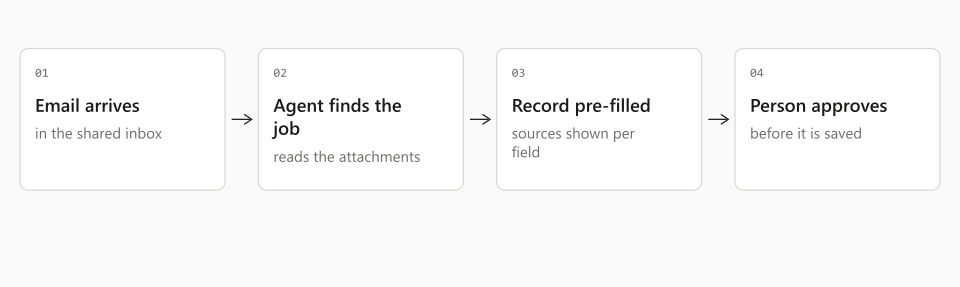
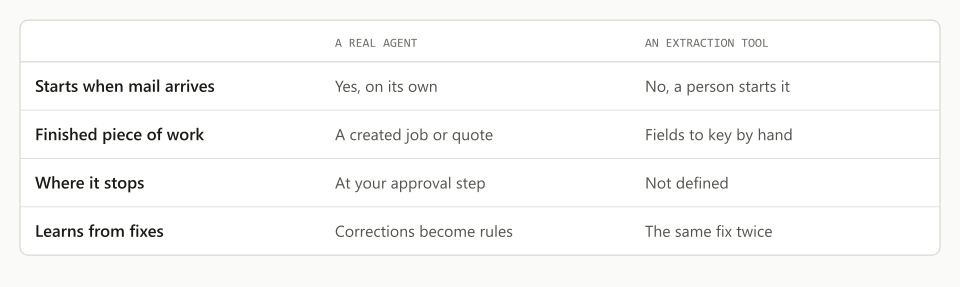
An AI system for freight is software that carries a task from the inbound document to a finished piece of work, instead of answering questions about it. A chatbot waits for a prompt and returns text. TIO is pointed at a job: it reads the email and the attachments, works out what the job needs, pulls the fields, checks them against records it has seen before, and produces the thing the job was for, a drafted filing or a shipment record. Then it runs on its own, goes for review, or waits for a person, depending on the setting for that action.
The distinction matters because the first wave of AI tools for freight stopped at extraction. They read a PDF and handed back structured data, and someone keyed that data into the system of record by hand. The keying was the job. Software that stops short of it saves some reading time and leaves all of the typing.
Most companies are still on the wrong side of that line. In McKinsey’s State of AI research, reported in March 2026, 23 percent of organizations were scaling an AI agent in at least one business function and another 39 percent were experimenting, but within any single function no more than 10 percent had reached scale. The gap between trying AI and getting value from it is, in freight at least, exactly the gap between extracted data and finished work.
What do AI systems do at a freight forwarder?
AI systems take on the forwarder’s repeatable back-office jobs one job at a time, the same way the team itself is organized around desks. That is how TIO is built for freight forwarders and freight brokerages: order entry, payables checks and customs filing prep are separate jobs, each reading the same inbox your team already reads.
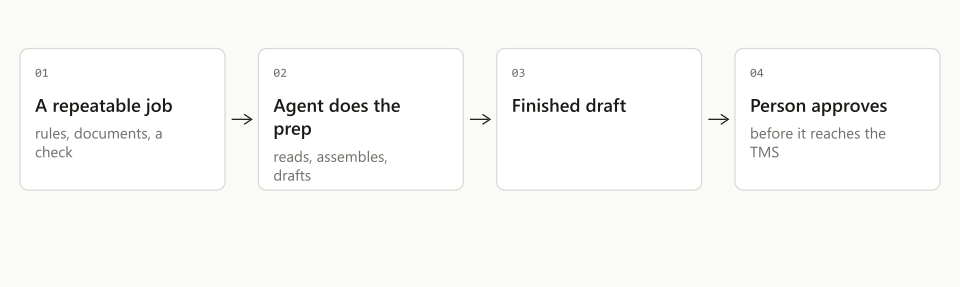
Every job follows the same shape:
- 01Your inboxBooking confirmations, worksheets, house bills, invoices
- 02TIOTIO reads the email and assembles the draft for the job
- 03Your teamflagged recordsA person reviews what the settings send for review and corrects anything wrong
- 04TMS and portalThe lot lands in the systems you already run under your action settings. A customs filing waits for a person
Work arrives by email, because in freight everything arrives by email: the booking confirmation, the worksheet, the house bill, the invoice. TIO picks up the message and its attachments, does the reading and assembly a person would have done, and prepares the finished work. Each action TIO can take has its own setting: it runs on its own, it sends the work for review, or it waits for a person’s reply. Anything outside your rules goes to a person. A customs filing is prepared as a draft, and a person on your team reviews and files it.
What does TIO do for order entry?
For order entry, TIO takes the documents for a booked shipment and creates the complete lot in your TMS, charge lines included, and sends a review email that shows every field. Order entry is the highest-volume keying job in the back office: an ocean import lot runs twenty-odd fields sourced from four different documents, call it 30 minutes by hand, and the forwarder we measure builds more than 25 lots a week. We wrote a full deep dive on how TIO does order entry.
TIO reads the bill of lading, house bill, delivery order, and packing list, pulls the fields, and resolves the parties against lots the team has built before, so a consignee spelled three ways across three documents lands as the one record you actually use. It creates the lot with the charge lines and sends a review email that shows every field. A party it cannot match, or two documents that disagree, go to a person.
For a warehousing operation, TIO does the same job under a different name: a delivery order arrives by email and a shipping entry has to exist in the system. The read and the review email are the same.
What does TIO do for payables?
For payables, TIO reconciles the charge lines on a job against the vendor invoice and flags the gaps before they get paid. Reconciliation is the job that slips, because it is nobody’s morning priority. A rate that came in above the quote, a charge on the invoice that never made it onto the job, a duplicate line: each one is real money out, and by month end nobody has time to hunt for them line by line.
TIO runs the standing check a person rarely gets to. It reads the job’s charges and the vendor’s invoice, matches line against line, and books the lines that match, for vendors you have approved. Every mismatch goes to a person, who decides what it means: dispute it, correct the job, or approve it as it stands. TIO does not pay.
- BY HAND
- ~30 min per lot
- TIO
- Seconds, then you review
- BY HAND
- Month end, or never
- TIO
- Every job, you review
- BY HAND
- ~15 min per filing
- TIO
- Seconds, you submit
What does TIO do for customs filing prep?
For customs filing prep, TIO turns an origin worksheet into a drafted security filing (the ISF), ready for a person to review and submit. By hand the filing takes about 15 minutes of keying, about 20 times a week at the forwarder we measure. TIO reads the worksheet and its attachments, resolves the parties and tariff codes the way the team has filed them before, flags anything it is not sure about, and prepares the draft.
A filer on your team reviews every draft and makes every submission, because the filing goes out under a filer code that belongs to a person.
How much time do AI systems actually save?
At the US import forwarder running TIO in production, the measured keying was about 17.5 hours a week, close to two days, and TIO now does it in the background. The math is plain. More than 25 lots a week at about 30 minutes each is roughly 12.5 hours. About 20 customs filings at 15 minutes each is another 5. Those are first-party figures from a live operation, consented for use here, not an industry estimate.
Side by side, the same jobs look like this:
| The job | By hand | With TIO | Weekly volume |
|---|---|---|---|
| Customs filing prep | ~15 min per filing | Drafted in seconds; a person reviews and submits | ~20 filings |
| Lot / order entry | ~30 min per lot | Created in seconds; a review email shows every field | 25+ lots |
| Charge reconciliation | Month end, or never | Standing check; a person reviews every flag | Every job |
The saved hours only matter if they turn into something. Nobody hires an ops team to retype worksheets. The forwarder that gets close to two days a week back spends it on the work customers notice: answering the client before the client has to chase, catching the exception while the container is still at origin, quoting faster, taking on the next account without a new hire.
How do you put TIO to work without risking a bad filing?
Each action TIO can take has its own setting, and you start with one job, not ten. The pattern that works:
- Pick the job that hurts most. For most import forwarders that is order entry.
- Connect TIO to the inbox where that work already arrives. There is no migration and nothing new for the team to learn.
- Let TIO read a batch of your recent jobs first, so we can write your parties, your codes, and your conventions into rules for your operation instead of a generic template.
- Run it alongside your current process. TIO does its work. Your team reviews what the settings send for review and corrects it.
- Keep correcting. When your team corrects TIO, the correction becomes a rule for your operation. It is a rule, not model training.
- Add the next job once the first one has earned it.
The settings are not a compliance checkbox. They are the design. Each action can be set to run, go for review, or wait for a reply, and you change one action at a time as TIO earns trust. A customs filing always stays with a person.
Does TIO replace your TMS or your team?
Neither, and a tool that claims otherwise should worry you. TIO sits between the inbox and the systems you already run. Your TMS stays the system of record. TIO writes into it through an adapter built for your TMS, so there is no rip-and-replace and no parallel system drifting out of sync.
The team stays the team, too. TIO removes the 15 and 30 minute blocks of retyping that sit between a document arriving and a record existing. Everything that requires a forwarder stays: the judgment call on a flagged HTS code, the relationship with the client, the exception no playbook covered. TIO does the work. Your team makes every call.
TIO builds AI systems that run logistics for freight forwarders and freight brokerages. Order entry, payables and customs filing prep are described above. TIO runs in production today at a US import forwarder and a US trucking agency. See what TIO does. If two days a week of keying sounds familiar, let’s have a quick discussion about your process. We work around your people and your schedule. Your people, your processes, not the other way around.
Frequently asked questions
What are AI systems for freight forwarders?
They are a set of back-office jobs that TIO runs for you. TIO creates the lot with charge lines from the order documents, reconciles job charges against vendor invoices, and drafts customs paperwork for a licensed person to file. Each action has its own setting: it can run, be sent for review, or wait for a person's reply. Customs filings remain human-controlled.
Does TIO file customs paperwork or write to the TMS on its own?
You choose, per action. Customs is fixed: TIO drafts the filing and a team member reviews and files it, because CBP requires a human filer of record. For the rest, each action has its own setting: it runs on its own, it sends the work for review, or it waits for a person's reply. Anything outside your rules goes to a person. You can change a setting whenever you want.
How much time does TIO save a freight forwarder?
Measured at a US import freight forwarder running TIO in production: lot creation went from about 30 minutes by hand to seconds, across 25+ lots a week, and filing preparation went from about 15 minutes to seconds, across about 20 filings a week. That is roughly 17.5 hours of keying a week, close to two days, handed to TIO, with the team still reviewing each lot and each filing TIO prepares.
Does TIO work with the TMS a freight forwarder already runs?
Yes. TIO works in the systems you already run: the TMS, spreadsheets, shared drives, a CRM and email. It reaches your TMS through an adapter built for it. Adapters run in production for two TMS platforms. Another TMS needs its own adapter first. There is no migration and the TMS stays the system of record. The same pattern covers warehousing operations, where the job is a shipping entry created from an emailed delivery order rather than an import lot. Start with one job, add the next when the first one has earned it, and nothing about the existing stack changes.