- 01Fixed list of codeseach with its origin
- 02Schedule recheckedagainst the published rateSources disagreegoes to a person
- 03Compared with entriesthe broker already filed
- 04Weekly report emailedwhat moved and why
A weekly HTS code and duty rate audit is a scheduled recheck of every tariff code a forwarder’s customers import, by origin country, against the current US tariff schedule and the broker’s filed entries. TIO’s customs and duty agent runs one every Monday. On its first live run it checked 30 code and origin pairs in under 7 minutes, confirmed 29 of them against the government schedule, and flagged 1 where two sources disagreed, for a person to look at. The result is one email to the operations team: what changed this week, what needs a look, and the full duty on each line, split into base duty, Section 301, Section 232 and antidumping or countervailing duty, with the same table attached as a spreadsheet. The agent does not classify goods and files nothing. Classification and the entry stay with your licensed customs broker.
- 30Code and origin pairs recheckedone run
- 7 minTime for the whole list6.8 measured
- 29 + 1Confirmed, and sent to a persontwo sources
- 41Filed entries read and tied to their totalssince May 30
What is a weekly HTS and duty audit?
It is 2 checks run on a schedule: a rate watch and an entry check. The rate watch takes each HTS code your customers import, pairs it with the country the goods come from, and looks up the duty that applies today. The entry check reads the entry summaries your broker has already filed and records what the broker declared on each line.
These 3 terms come up below.
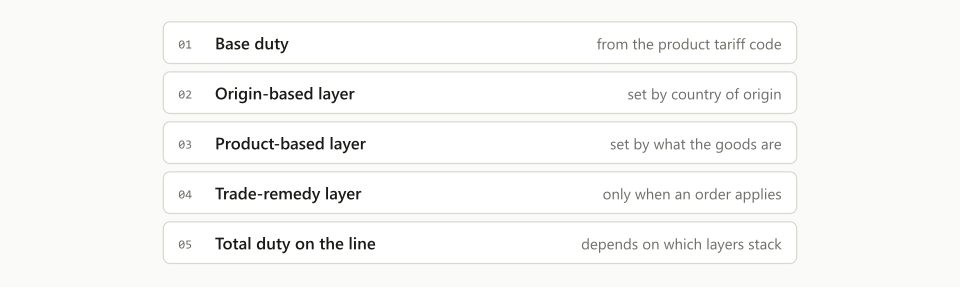
- Duty stack. The total duty on one line: a base rate plus the extra layers that apply to that product from that country, such as Section 301, Section 232 and antidumping or countervailing duty (AD/CVD).
- Entry summary. CBP Form 7501, the document a broker files for a customs entry. It lists each line’s code, value, rate and duty, and the totals for the shipment.
- Code and origin pair. One code from one country. The same code from two countries is two pairs, because the extra layers differ by country.
A single lookup tells you today’s duty. Your customer asks something else: “has anything changed on the goods we bring in?” You can only answer that if you checked last week too.
What is tariff stacking, and why is the total hard to check?
Tariff stacking is when several duties apply to one imported line at the same time. Most layers add to the base rate. A few do not: heading 9903.82.10 sets the base rate and Section 232 together at 15%. The rules come from proclamations and CBP messages, and the metals rules alone changed on April 6 and June 8, 2026. The chart, the order and the rules are in what tariff stacking is.
- Base duty7.5%
- Section 30125.0%
- Section 23225.0%
The total is hard to check because the layers live in different places. The base rate is on the product’s own line. The Section 301 and Section 232 layers are separate headings in Chapter 99, each with a list of the product codes it covers. CBP’s April 2026 metals guidance alone has 16 of them. Read one list wrong and the duty rate by HTS code you gave the customer is off by 25 points.
How often do HTS codes and duty rates change?
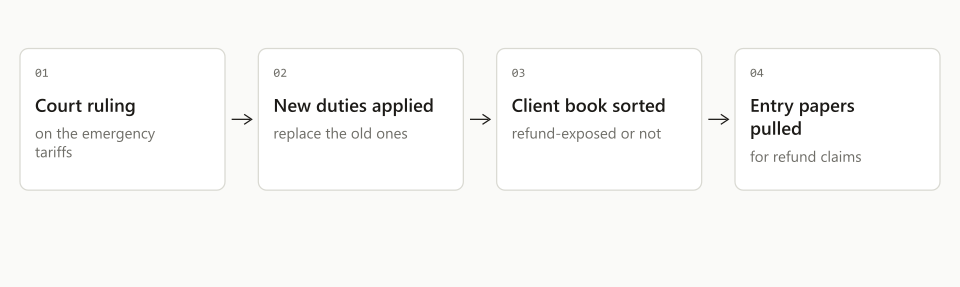
Often enough that the rate you quoted last month may not be the rate today, and the customer asks the forwarder first. The schedule the Monday run checked against was revision 20 of the 2026 edition. Revision 21 took effect 4 days later, on October 9, the 6th revision since August 14. The layers on top of the base rate move on their own calendars, by proclamation, court ruling or notice. In February one executive order ended a whole tariff layer in a day, after the court ruling covered in what forwarders must know about the IEEPA tariffs, and every such change fills the quote inbox the same afternoon, covered in tariff volatility and ops capacity.
A forwarder is usually not the customs broker. It is still the company the importer emails with “what will the duty be on this?” before a purchase order goes out, and a wrong answer is already inside the customer’s selling price.
There is also a clock on fixing an entry that went in at the wrong rate. A post summary correction has a time limit:
“within 300 days from the date of entry”, or up to 15 days before the scheduled liquidation date, whichever comes first. (U.S. Customs and Border Protection, Post Summary Correction guidance)
Find the problem in week one and the broker has months to act. Find it at the annual review and the window may be shut.
What does the agent check each week?
It runs 7 steps, and code makes every comparison. No model decides a rate.
- Build the list. The codes and origins come from the forwarder’s own filings over the last 12 months, most-filed first. The live list holds 31 pairs today, across 5 origin countries.
- Look up the full duty stack. For each pair, the agent pulls every layer from a commercial tariff rate source.
- Check it against the government schedule. Each line is compared with the current US International Trade Commission schedule. For the Section 301 China lists, the agent also checks whether the product is on the list at all, not only what the list’s rate is.
- Read twice. Every lookup runs twice and both reads must match. Any single line at or above 50% is read three times, and the email says in plain words what that line is and why it applies.
- Compare with last week. Anything that moved goes to the top of the email.
- Read the filed entries. From the entry summaries the broker sent, the agent records the antidumping and countervailing duty declared on each code.
- Send one email. One table, one short list of items that need a person, and the spreadsheet.
- 01List31 pairs
- 02Look upevery layer
- 03Checkgov schedule
- 04Read twicemust match
- 05Comparelast week
- 06Sendabout 7 min
The second step alone is not enough. A rate source can return a real tariff line that does not apply to your product. Two matching reads, a third for any very high line, and a check against the government text catch that.
What does the weekly email look like?
It is 1 email with 5 sections and an 8-column rate table, and a person can read it in a minute: changes first, then what needs a look, then the table.
| Customer | US line | From | Base | Sec. 301 | Sec. 232 | AD/CVD | Total |
|---|---|---|---|---|---|---|---|
| Meridian Fasteners | Steel fasteners | China | 7.5% | 25.0% | 25.0% | Filed | 57.5% |
| Halden Packaging | Packing machine | Italy | 0.0% | 0.0% | 0.0% | Not flagged | 0.0% |
| Halden Packaging | Machine parts | Germany | 2.5% | 0.0% | 0.0% | Not flagged | 2.5% |
| Corvale Labs | Empty capsules | China | Checking | 25.0% | 0.0% | Order list | To follow |
3 details in that layout came from the forwarder’s own desk.
Highest total first. The costliest lines sit at the top of each customer’s block.
Plain words. The email never names a tool or prints a status code. A line with no rate says why, in a sentence.
AD/CVD never says “None.” A published flag only tells you a code is on an order list. It does not tell you whether duty is owed on your goods. So the column reads “Filed” when filed entries declared it, “Order list” when the code is listed, and “Not flagged” otherwise. No flag is not the same as no duty.
How does it use the entries your broker already filed?
It treats the filed entry as the record of what the broker declared, and it only trusts an entry that adds up. When the broker emails an entry summary, the agent reads the form and adds its lines. If the duty, tax and fee lines do not tie to the totals printed on the same form within 2 cents, the entry is listed as not reconciled and feeds no number.
All 41 entry summaries on file so far passed that gate, covering 353 duty lines and entry dates from May 30 to October 4, 2026.
The filed entries changed one column of the weekly email. AD/CVD no longer depends on a flag from a rate source. On its first live week, the flag-based column contradicted what the filed entries showed, and the forwarder caught it. The column now starts from the entries.
The filed record also answers what a rate table cannot: which code the broker used, whether two shipments of the same product went in under different codes, and what the entered value was. Those are questions for the broker, and the agent phrases them that way.
What happens when the question is which code applies?
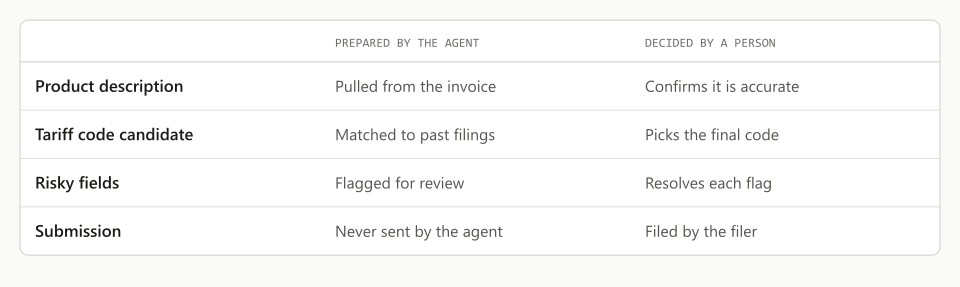
The agent gives candidates and questions, never a code to file. A code a person names is always looked up as written. When an email asks what code a product falls under, the reply stops at the 6-digit level, 4 digits short of a full 10-digit code, and asks for what the broker would need.
Machinery is the usual example. A machine shipped complete, the same machine shipped as a line of separate units, and a carton of spare parts can each raise a different classification question. So the reply asks up to 3 short ones, such as:
- Is it manual, semi-automatic or fully automatic?
- Is it shipping complete, in parts, or as one unit of a larger line?
The agent asks 1 round of questions, then gives its best answer with the assumptions stated. The filing decision belongs to the licensed customs broker, and the email says so.
How is it set up for one forwarder’s customers?
We set it up around what each forwarder’s customers import, through the 8 settings below. The first forwarder’s list holds 31 pairs across 5 origin countries, taken from 12 months of its own filings. A forwarder moving supplement ingredients watches different codes and duty layers than one moving machinery.
| Setting | What is set for each forwarder |
|---|---|
| The list | Codes and origins from your own filings, most-filed first; size of the list |
| Changes to the list | One sentence by email: “please add [code] from [country]“ |
| Customers | Which importers to show, and which related companies to group as one |
| Columns | Which duty layers get their own column |
| Recipients and timing | Who gets the email, and when; Monday morning by default |
| Explanations | The level above which a line must be explained; 50% by default |
| Broker entries | Which broker senders the agent reads entry summaries from |
| Questions any day | Email a code and a country, get the same table back |
What stays with a person and with the broker?
Everything that is a judgment or a filing. On the first live run that was 1 pair of 30, the one where two sources disagreed. The agent takes the repeated lookup and the comparison.
| Task | By hand | With the agent |
|---|---|---|
| Look up a duty stack | One code at a time, when someone asks | Every listed pair, every week |
| Notice a change | When a customer or broker mentions it | Top of Monday’s email |
| Check a suspicious rate | Trust one source | Two matching reads plus the government schedule |
| AD/CVD | A flag from a lookup tool | What the filed entries declared |
| Which code applies | Broker | Broker; the agent supplies questions |
| Filing and correcting an entry | Broker | Broker |
The email goes to your operations team. Nothing reaches your customer unless a person on your team forwards it, and every write the agent can make sits behind its own on and off switch with a record of what was sent.
How do you run a duty watch by hand?
You can start one this week with a spreadsheet, and it is worth doing before you automate anything.
- List your top 20 pairs. Take them from the last 12 months of entries, most-filed first.
- Record the full stack once. Each layer in its own column, with the date and the schedule revision.
- Recheck on a fixed day. Same list, same columns, every week. Mark what moved.
- Put filed AD/CVD beside the published flag. Take it from the entry summaries.
- Send disagreements to the broker. As a question, with the 2 sources attached.
Where does the customs and duty agent fit?
TIO is an AI agent workforce for freight forwarders and 3PLs, and the customs and duty agent works next to the agents that quote, enter orders and match payables. It reads the mailbox your team already uses and works alongside the TMS you already run. The full roster is on the agents page, and the forwarder setup is on AI agents for freight forwarders. The agent files nothing: a person on your team reads every email it sends, and the licensed customs broker decides the entry.
If your team answers duty questions from memory and old quotes, book a 20-minute demo. Bring 5 codes your customers import, and we will run the watch on them while you look.
Frequently asked questions
What is an HTS audit?
An HTS audit is a check of the 10-digit tariff codes on a customer's imports and the duty that applies to each one, by country of origin. A weekly audit repeats that check on a fixed list, compares the result with the week before, and reports what moved. TIO's agent ran its first live list of 30 code and origin pairs in under 7 minutes.
How often do HTS codes and duty rates change?
Often enough that weekly is the practical interval for a check. The US tariff schedule reached revision 21 of its 2026 edition on October 9, the 6th revision in 8 weeks, and the extra duty layers on top of it change on their own calendars. A rate quoted to a customer a month ago may no longer be the rate. A weekly run catches the change before the next quote or the next entry.
What is tariff stacking?
Tariff stacking is when more than one duty applies to the same imported line: a base rate plus layers such as Section 301, Section 232 and antidumping or countervailing duty. Most layers add to the base rate on the same customs value, so a 7.5% base rate with two 25% layers is a 57.5% total. A few Section 232 headings in the US tariff schedule set one combined rate instead, such as 15% in total.
Does an AI agent classify goods or file customs entries?
No. The agent looks up and rechecks rates for codes a person or a filed entry has already named. When the question is which code applies, it returns candidate headings at the 6-digit level and up to 3 questions, and the licensed customs broker decides. The agent files nothing with CBP.
What is the difference between a published duty rate and a filed duty rate?
The published rate is what the tariff schedule says applies to a code and origin today. The filed rate is what the broker declared on CBP Form 7501 for a real shipment. The audit shows both. It uses a filed entry only when the lines on the form add up to the form's own totals within 2 cents.
Can the weekly duty watch be set up differently for each forwarder?
Yes. The list of codes and origins comes from each forwarder's own filing history over the last 12 months, the team adds or removes a line with a one-sentence email, related importers can be grouped as 1 customer, and the forwarder picks who receives the email and which duty columns it shows.