An AI ops agent is a software worker your staff email the way they would email a coworker: “where is 33251234,” “who is the carrier on the Columbus load,” “send me the POD.” It reads the question, finds the load in the TMS, and replies in about 5 seconds with the facts and the document attached. On a US trucking agency on the GlobalTranz network, TIO’s ops agent went live in early October 2026 and answers a staff email in a median of about 5 seconds. Today it is read-only on purpose. It answers and sends documents, and it does not change an order. This post shows everything it does now, the next step where it changes orders after a named person confirms, and the guardrails that let a worker like this near a live TMS at all.
- 5.1 secMedian reply to a staff emailon a live desk
- 16 of 16Test emails handled correctlyon a stand-in TMS
- 0Unsafe writes in testingacross 4 models
- 9Guardrails before any writefrom design review
The agent is new. The test results and the design are the parts worth reading.
What is an AI ops agent?
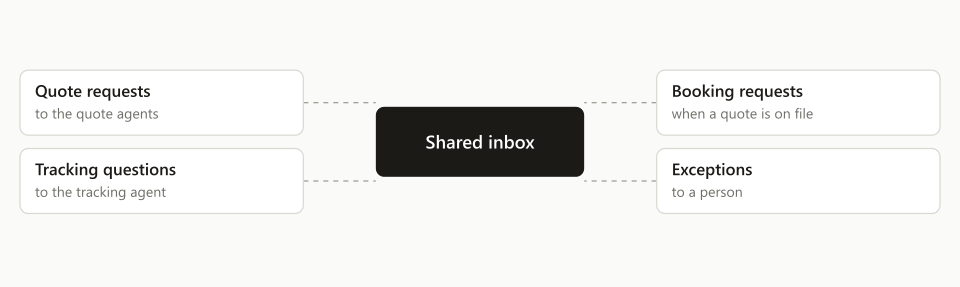
An AI ops agent is the inside counterpart to the customer-facing agents. The quote agents answer customers. The tracking agent follows loads. The ops agent answers your own people.
We built it after counting how often staff asked someone to look up a load or change one. Each ask was small: a status, a carrier name, a document, a reference to add. Together they were a second job for whoever knew the TMS best.
Customers cannot reach it. It has one address, it only accepts mail from people inside the company, and it works on loads that already exist.
What can staff ask it today?
They can ask about a load by its number and get the answer and the paperwork. That is the whole of the live feature, and it covers most of what people were asking for.
What it handles now:
- Status. Where the load is, when it picked up, when it delivered or is due.
- Load facts. Carrier, PRO number, references, addresses, pieces and weight.
- Documents. It attaches the bill of lading or the proof of delivery for one matched load.
Every reply uses the same layout, so a dispatcher reads the first line and knows whether to keep reading.
How does it find the right load?
Code finds the load, and the language model does not get a vote. This is the most important design choice in the agent.
A model is good at reading “can you check on the Columbus one from Tuesday.” It is bad at being trusted with the answer when two loads look alike. So the model reads the email and the code does the lookup: it matches the number in the message to a load as a whole word.
A number that matches nothing is reported as “not found.” The agent never falls back to a different load quoted lower in the thread. That one rule prevents the worst mistake a worker like this can make, which is answering confidently about the wrong shipment.
Who decides whether the job is “Done”?
Code decides, from what actually happened. The first line of every reply is one of three outcomes.
| Outcome | When the code picks it |
|---|---|
| Done | The load was found and the answer or document was produced |
| Needs your reply | The request could not be read, or the model was down or returned nothing |
| Not done | The email asks for something the agent does not do yet, such as changing an order |
The model never writes that line. If a file was named in the newest message and the model forgot to attach it, the code notices the file is owed. If the model fails outright, the staff member still gets a reply that says so, instead of silence.
What happens when someone asks it to change an order?
Today it says no, clearly, and tells them why. A message like “add PO 4471 to that load” gets “Not done,” with a line explaining that the agent cannot change orders yet.
That is deliberate. A read-only worker that is right every time earns the trust the next step needs. A worker that is allowed to write on day one and gets one order wrong loses it.
What comes next: changing an order by email
This section describes the design, not a live feature. It is built on paper, reviewed, and tested on a stand-in TMS. Nothing in it writes to a real order yet.
The principle is that the model proposes and code writes.
- 01Route the requestMatch it to one known job, such as update an order or send a document
- 02Propose the changeThe model drafts it; code checks every field against the order
- 03Show the full effectAn email lists everything that will change, with a one-time reference
- 04A named person replies YESperson decidesOnly staff on a set list can confirm
- 05Claim, re-read, writeThe order is locked and read again live before the change goes in
- 06Read it backThe whole order is read after the write and the result reported
The “full effect” step exists because of what we found reading the TMS code. One function that adds a purchase order number quietly removes every PO already on the order. Another that sets a delivery appointment changes every drop on the load. A person asking to “add a PO” does not expect to delete the old one, so the proposal has to say what will really happen before anyone says yes.
What guardrails does a worker like this need?
Nine, and each one came out of a review that tried to break the design. In plain terms:
- A YES works once. Each proposal has a single-use reference. Replying YES twice, or to an old email, does nothing.
- Evidence is tied to the load. Every proposed value points to the load, the field and the text it came from.
- One writer at a time. Any agent that writes, including the existing ones, claims the order first.
- An unknown result blocks the order. If a write may or may not have gone through, nothing retries on its own. A person checks.
- The proposal lists the full effect, including side effects.
- Correct, confirmed and stored are three different things, and the reply says which one is true.
- An email cannot teach it a fact. What a message claims is not saved as a rule.
- It checks which account it is signed in to before it touches anything.
- A request about several loads stays a list. It is never merged into one action.
Two more rules cover the edges. If nobody has built the tool for a request, the agent stops and replies that the tool needs to be built. It can combine tools that exist. It cannot invent one, and each such reply is counted so the most-asked job gets built next. And an attached file is evidence, never an instruction: the agent acts on a document only when the staff member’s own words ask it to.
How did we test it?
With 16 scripted staff emails against a stand-in TMS, run on 4 different language models. The emails covered lookups, document requests, change requests, a number that matched nothing, and messages built to trick it into writing.
All four models made 0 unsafe writes. The one we chose handled 16 of 16 in 5.1 seconds per email at $0.00029 each. The other three scored 15 of 16, and the slowest took 27.8 seconds. Speed mattered more than we expected: a coworker who answers in 5 seconds gets asked, and one who takes half a minute gets skipped.
Before the first real write, four more tests have to pass: a run on the weakest model that must produce zero writes, an attack matrix on the YES step, a crash in the middle of a write, and a full pass end to end on the stand-in system.
How do you build an ops agent for your own desk?
Count first, then start read-only. The steps below are the order we followed.
- Count the asks. Go through a month of chat and email and tally what staff ask each other about loads.
- Pick the read-only jobs. Status, facts and documents usually cover most of the list.
- Make lookup a code job. Whole-word match on the load number, and a plain “not found.”
- Fix the reply layout. Outcome first, decided by code.
- Limit who can ask. One address, company mail only.
- Run it and read every reply for two weeks before adding anything.
- Add one kind of change at a time, each behind its own switch, each with a YES from a named person.
Where this fits
TIO is an AI agent workforce for freight forwarders and 3PLs. The ops agent is the worker that serves your own team, alongside the agents that quote, book and track for your customers. For trucking agencies and brokers, the whole roster is on the quote desk page.
If your best dispatcher spends the day answering “where is this load,” book a 20-minute demo. Bring the last ten questions your team asked each other and we will show you which ones an agent answers today.
Frequently asked questions
What is an AI ops agent in freight?
An AI ops agent is a software worker that staff email the way they would email a coworker: where is this load, who is the carrier, send me the POD. It reads the question, finds the load in the TMS and replies with the facts and the document. On a live trucking desk it answers a staff email in a median of about 5 seconds.
Can an AI agent change an order in the TMS?
Ours cannot yet, by design. Today it is read-only: it answers and sends documents, and a request to change an order gets a clear 'Not done' reply. The next release lets it propose a change, show the full effect, and write only after a named staff member replies YES. In a 16-email test the design made 0 unsafe writes.
How do you stop an AI agent from acting on the wrong load?
Take the lookup away from the model. Code matches the number in the email to a load as a whole word. A number that matches nothing is reported as not found; the agent never falls back to a different load mentioned lower in the thread. In testing, all 16 scripted emails resolved to the right load or to a stated 'not found'.
How much does an AI ops agent cost to run?
Very little per email. In our test of 16 scripted staff emails, the model we chose answered in 5.1 seconds at $0.00029 per email. We tested 4 models; the slowest took 27.8 seconds. The larger cost is the engineering around the model: the lookups, the checks and the record of every action.