- Load booked
- Pickup confirmedcustomer is told
- In transit
- Deliveredcustomer is told
- Proof of deliverysent in the same thread
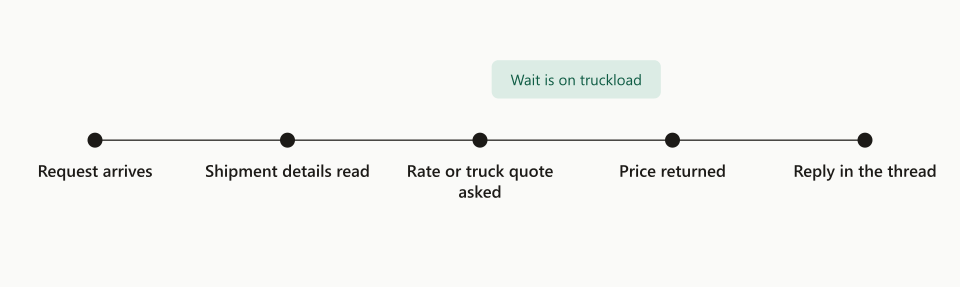
- Wait for the document: from delivered to proof of delivery
Automated freight tracking is software that watches every booked load and sends the customer each update, from pickup to proof of delivery, without anyone making a check call or forwarding a document. On a US trucking agency on the GlobalTranz network, TIO’s agents send the pickup notice within 2 minutes of the carrier’s status, then the delivery update and the proof of delivery, each in the same thread as the booking. On truckload, the proof of delivery reached the customer a median 19.2 hours after the freight was delivered. Nobody on the desk looked up a load, downloaded a file or wrote a reply to make that happen. This post covers what the agent sends and when, where the delays really come from, how it finds the right document, and what it hands to a person.
- 2 minCarrier status to pickup noticeonce the status lands
- 19 hrMedian delivery to POD emailtruckload
- 5Events emailed per shipmentbooking to POD
- 6Critical causes that alert the teama closed list
Every number here comes from the agency’s own order and email records. There is no manual baseline for tracking the way there was for quoting, because nobody timed how long a check call or a POD request took before.
What is automated freight tracking?
Automated freight tracking means the system, not a person, notices that a load changed state and tells whoever needs to know. A trucking desk normally does this by hand: someone opens the TMS, reads the status, calls or emails the carrier if it looks stale, then writes to the customer. That routine is the check call, and it repeats for every load, every day it is on the road.
A tracking agent replaces the routine, and leaves the judgment alone. It reads the status the carrier reports, compares it with the last status it saw, and acts only on a real change. It works from the booking the quote agents created, so it already knows the customer, the thread, the reference numbers and the delivery day.
What does the agent send, and when?
It sends one email per real event, in the customer’s own thread, and nothing in between. Five events matter on a truck shipment, and each has one message.
- 01Bookedbill of ladingThe bill goes out once the order exists and, on truckload, a real carrier is assigned
- 02Picked uppickup noticeCarrier, PRO number and the expected delivery day
- 03Something went wrong→ personOverdue pickup, refusal, a delivery that slipped: the team is told first
- 04Delivereddelivery updateSent when the carrier confirms delivery; an apology if it is late
- 05Proof of deliverydocument attachedThe signed receipt, as soon as the carrier posts it
Three rules keep those emails from reading like a machine wrote them.
- Answer the newest message in the thread. If the customer wrote last, the update replies to them. If our own booking confirmation was last, it continues from that. An update that hangs under a two-week-old email looks lost.
- Vary the opening. The delivery update draws on 28 different opening lines, so a customer who receives three in a week does not read the same sentence three times.
- Say sorry once when it is late. A delivery update or a POD that goes out after the delivery day opens with an apology, one time per shipment.
The agent also never writes that a document is “signed” unless a check has actually seen a signature on it.
How fast does the POD reach the customer?
On truckload, within a day: a median 19 hours after delivery, with three quarters inside 25 hours. LTL is slower, at a median of about 69 hours.
The gap between the two modes is the carrier’s, and it is worth saying plainly. A truckload driver or dispatcher sends the signed paperwork in, usually the same or next day. An LTL carrier scans the delivery receipt at a terminal and posts the image later, often after the invoice cycle starts. The agent checks for the document on every pass and sends it within minutes of its appearing. It cannot send a file the carrier has not posted.
Loads still waiting on a document sit on a list the team sees every afternoon, so a missing proof of delivery is chased by a person after two business days instead of being discovered when the customer asks.
Why is the pickup notice sometimes hours late?
Because the carrier’s status reaches the broker’s system late, and no amount of tuning on the broker’s side fixes that. We measured it on four LTL carriers by comparing each carrier’s own pickup scan with the moment the status arrived in the TMS. The gap ran from about 1 hour to about 7.5 hours.
The agent’s own part is short. Once the status lands, the pickup notice goes out within 2 minutes.
So the fix is to stop waiting for the feed. The agent asks the carrier directly, using the bill of lading number it has had since booking. A “not found” answer means the freight has not been picked up. The first real answer carries the PRO number, hours before the feed would have delivered it.
Carriers differ in what they allow. Some answer a bill of lading lookup through a public tracking page or an open API. Others need an account, and one puts a CAPTCHA in front of its tracking page, which we do not automate past. Where direct lookup is not available, the customer gets the notice when the feed arrives, and we say so instead of promising a time we cannot keep.
How does the agent find the right document?
By the document’s type in the TMS record, never by its file name. This is the lesson that cost us the most.
For two weeks our first version looked for a POD by guessing from file names. LTL documents arrive under storage names that are strings of letters and digits, so the guess matched nothing and the agent sent zero LTL proofs of delivery. Nothing errored. The loads simply sat as “waiting.”
The rule now is that a file counts as a proof of delivery only when the system of record labels it as one. The agent reads the shipment’s document list, takes the entry typed as a proof of delivery, and fetches that exact file. If the label is missing, it waits and the load shows on the afternoon list.
What does it flag to a person?
Anything that needs a decision, and it tells the team before it tells the customer.
| Problem | How the team hears about it |
|---|---|
| POD overdue | Daily summary |
| Pickup overdue | Daily summary |
| Delivery overdue | Daily summary, and an alert when it is critical |
| Rate out of line on a repeat lane | Alert |
| Carrier refused the load | Alert |
| Load would lose money | Alert |
| Hand-booked load left open | Daily summary |
Alerts come from a closed list of 6 critical causes. Adding a seventh takes a decision by the owner, because an alert channel that fires for everything gets ignored within a week. Everything else goes into one daily summary.
What about loads the team books by hand?
They are tracked too, with a lighter touch. Not every load goes through the quote agents: some are entered directly in the TMS by a person. The agent adopts those for status only. It records their events and raises the same problems, and it sends no customer email, because it has no thread to answer.
The one exception is the proof of delivery. When a hand-booked load delivers and the document appears, the agent sends it as a new email to an address the agency has set for that account.
What stays with a person?
Everything that involves blame, money or a phone call. The agent’s job ends at telling the right person, with the facts attached.
- Damage, shortage and overage. A note on the delivery receipt starts a claim. A person files it.
- Carrier disputes. A refusal, a missed pickup, a reweigh.
- Rescheduling. Changing an appointment means talking to a receiver.
- Anything the customer is upset about.
As with the quote agents, every email the tracking agent can send sits behind its own on and off switch, and each send is recorded: which load, which event, which message, when.
How do you set up automated tracking on your own desk?
Start from the booking record and add one event at a time. The order matters, because each step depends on the one before it being trustworthy.
- Get the booking data clean. The agent needs the customer’s thread, the references and the delivery day on every order. If bookings are entered inconsistently, fix that first.
- Record status before you send anything. Run a week where the agent only logs events. Compare its log with what your team saw.
- Turn on the delivery update first. It is the least risky message and the one customers ask for most.
- Add the proof of delivery, by document type. Check ten loads by hand before trusting it.
- Add the pickup notice, then direct carrier lookups for the carriers that allow them.
- Write the short list of critical causes and route everything else to a daily summary.
Where this fits
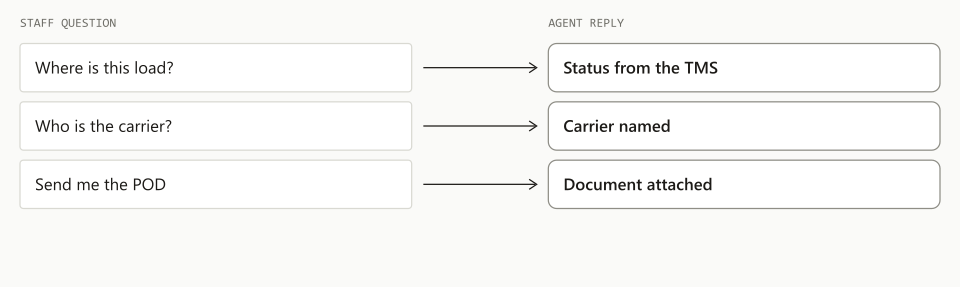
TIO is an AI agent workforce for freight forwarders and 3PLs, and tracking is the part of the trucking roster that runs after the quote is won. The same agents that answer an LTL rate request in seconds book the load and then follow it to the signed receipt. Staff who need to ask about a load can email the ops agent.
If your team spends its afternoons on check calls and POD requests, book a 20-minute demo. Bring three loads that are on the road today and we will show you what the agent would have sent.
Frequently asked questions
What is automated freight tracking?
Automated freight tracking is software that watches every booked load and tells the customer what changed without anyone making a check call. On the desk we measured, the agent sends the pickup notice within 2 minutes of the carrier's status, then the delivery update and the proof of delivery, all in the same thread as the booking.
How long does it take to get a POD after delivery?
It depends on the mode. On truckload, the agent emailed the proof of delivery a median 19 hours after delivery, and three quarters went out within 25 hours. On LTL the median was about 69 hours, because LTL carriers post the scanned delivery receipt a day or more after the freight is delivered.
Why is a pickup notice sometimes hours late?
Because the carrier's status reaches a broker's system late. We measured the gap on four LTL carriers and it ran from about 1 hour to about 7.5 hours after the driver's own pickup scan. The agent sends its notice within 2 minutes of seeing the status, so the fix is to ask the carrier directly by bill of lading number.
What should a tracking agent hand to a person?
Anything that needs a judgment or a phone call. The agent logs problems such as an overdue pickup or a missing POD in one daily summary and sends an alert only for a closed list of 6 critical causes. Claims, damage notes, carrier disputes and rescheduling stay with the team.