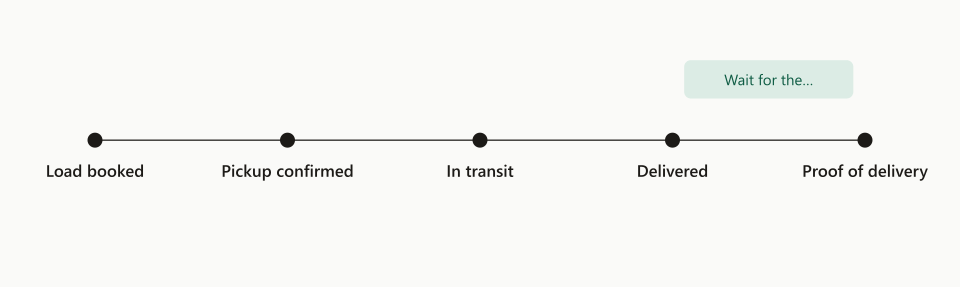
- 01Carrier statuspicked up, delivered
- 02Tracking softwareshows it on a screen
- 03Update sentpickup, delivery, proof
- 04Problem heldfor a person on your team
Freight tracking software shows where a shipment stands; a system like TIO also sends that status to your customer and holds the problems for your team. Tracking software collects carrier status and puts it on a screen. Someone on your desk still reads it, decides whether the customer needs to know, writes the email and attaches the paperwork. TIO does that second part. It follows each booked shipment, reads the carrier status and sends 3 messages on its own: the pickup notice, the delivery update and the proof of delivery. It holds 3 kinds of problem for your team: a late pickup, a cancellation on or after pickup day, and a date change in your TMS without your reply. TIO’s tracking runs in production at a US trucking agency and a US import forwarder. It reads carrier status. It does not show live truck or vessel position.
Your team answers “where is my load” by hand. Before you buy anything, find out whether your time goes into knowing the status or into telling the customer.
What is freight tracking software?
Freight tracking software collects status for each shipment and shows it to someone. The status comes from the carrier: picked up, in transit, delivered. The software puts it in one place, so your team does not have to visit each carrier’s site.
That solves the lookup. It does not solve the reply. A customer who wants to know where their load is still emails your desk, and a person still opens the status, writes the answer and sends it.
So there are 2 separate jobs inside “tracking”:
- Knowing the status. Pulling carrier status into one place.
- Acting on the status. Telling the customer, sending the document, and raising a problem with the right person.
Tracking software does the first job. The second job is where your desk spends its time.
What does a “where is my load” desk do by hand?
A tracking desk turns carrier status into customer emails. Here is the manual version of one shipment:
- The load is booked. Someone sends the customer a confirmation.
- The carrier picks it up. Someone checks the status and emails a pickup notice.
- The customer asks where it is. Someone looks it up and replies.
- The load is delivered. Someone checks, then waits for the proof of delivery.
- The proof of delivery posts. Someone downloads it and emails it to the customer.
Each step is a lookup and an email. None of them is hard. Together, across a full board of loads, they fill the day. The software in step 2 tells your team what happened. It does not send step 2’s email.
What does TIO add on top of tracking software?
TIO does the acting. It follows each shipment, tells the customer when something real changes and sends the proof of delivery.
| Step | Tracking software | TIO |
|---|---|---|
| Collect carrier status | Yes | Reads the same carrier status |
| Show status to your team | On a screen | In a notice or an email |
| Email the customer a pickup notice | A person writes it | Sent on its own for a booked shipment |
| Email a delivery update | A person writes it | Sent on its own for a booked shipment |
| Send the proof of delivery | A person downloads and attaches it | Sent on its own when the carrier posts it |
| A late pickup or a cancellation | Shown on the screen | Held for your team, with the facts attached |
| A date change in your TMS | Shown on the screen | Held for your team until you reply |
| Live truck or vessel position | Depends on the product | Not offered |
The two are not exclusive. A desk can keep its tracking feed and add a system that sends the updates.
What does TIO hold for your team?
TIO holds the problems. A late pickup, a cancellation on or after pickup day, and a date change in your TMS without your reply all wait for your team.
That is on purpose. A late load needs a conversation. The customer may need a new delivery time, a call or an apology. TIO puts the shipment and its status in front of the right person, and that person makes the call.
Each action TIO takes has its own setting:
- Runs on its own. Work inside your rules, such as a pickup notice on a booked shipment.
- Sent for review. TIO finishes the message and a person on your team checks it.
- Waits for a reply. TIO prepares the change and makes it only when your team says so.
- Held for your team. Anything outside your rules, with the facts already attached.
You set each one. A desk can start with each message sent for review, then let the pickup notice run on its own once the team trusts it.
How do staff questions and the shared inbox fit?
Two more jobs sit next to tracking, and they take the rest of the lookups off the desk.
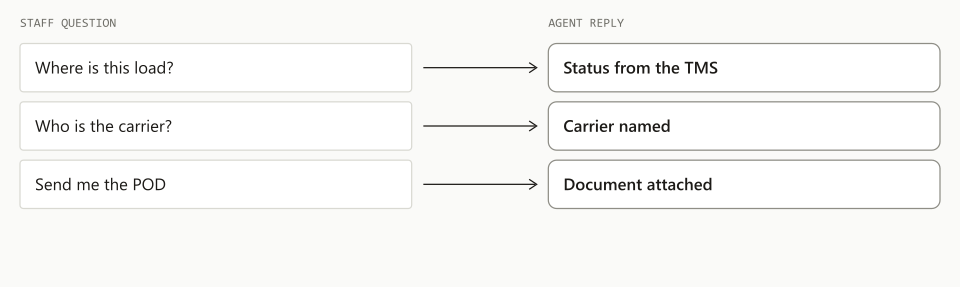
- Staff questions. Your own staff email a question about a load and get the status, the details and the document back, with the bill of lading or proof of delivery attached. TIO reads the records for this. It does not change an order.
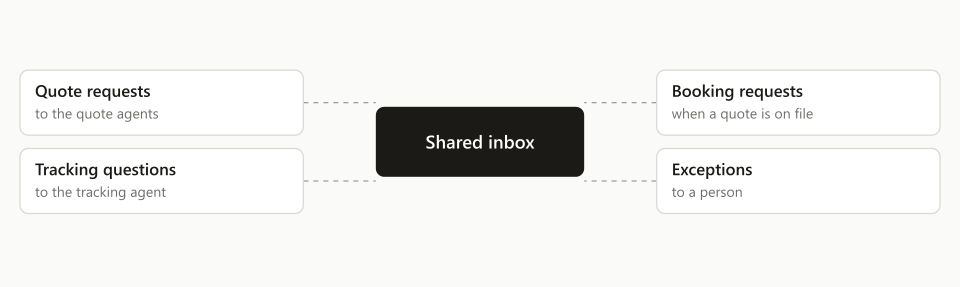
- Inbox triage. TIO sorts the shared desk mailbox by what each email is, which shipment it belongs to and who should handle it, then sends that person a notice. It does not reply to the customer.
Both run at a US trucking agency. With tracking, they cover status questions from 3 places: the customer, your own staff, and the shared inbox.
What do the updates look like?
Here is one shipment’s thread. Example with sample numbers, not a customer’s record:
| Event | What the customer gets | Who sends it |
|---|---|---|
| Carrier picks up 4 pallets | Pickup notice in the booking thread | TIO |
| Carrier status shows delivered | Delivery update | TIO |
| Carrier posts the signed receipt | Proof of delivery, attached | TIO |
| Pickup runs late | A call or email from your team | Your team, with the status in hand |
The customer gets each message in the same thread as the booking. Nobody on your desk typed the first 3.
How do you choose between tracking software and TIO?
Start from where your team’s time goes. Ask these 4 questions about your own desk:
- Who writes the customer emails today? If a person writes each pickup notice and delivery update, the time is in acting, not knowing.
- Where do the proofs of delivery come from? If someone downloads each one and attaches it, that is a job TIO takes.
- How do problems reach the right person? If a late pickup sits on a screen until someone notices it, you want it held for a named person.
- How many status questions come from your own staff? If your team asks each other where a load is, staff questions take that off the desk.
Count before you decide. For one week, have your desk tag each status email it sends: pickup notice, delivery update, proof of delivery, or an answer to a question. That count is your baseline. It also tells you which of the 3 messages to switch on first. Pick the one with the largest count, keep it on review at the start, and let it run on its own when TIO matches your team’s work on real shipments.
If your problem is that status is scattered across carrier sites, you need the feed. If the status is in one place and your team still spends the day emailing it, you need the step after it.
What does TIO not do in tracking?
TIO reads carrier status and acts on it. It does not:
- Show live truck or vessel position on a map
- Manage a carrier’s fleet or dispatch drivers
- Change a booked order on its own
- Reply to a customer from the shared inbox
TIO sends what the status already says. Anything that needs a decision waits for your team.
Where does TIO fit?
TIO builds AI systems that run logistics for freight forwarders and freight brokerages. Tracking is one of the jobs: TIO follows each booked shipment, tells the customer when something real changes and sends the proof of delivery. It works inside the systems you already run, and your TMS stays the system of record.
See the tracking job on the jobs page, how it works for domestic freight, and our earlier post on automated tracking and proof of delivery.
Let’s talk through your tracking desk
Let’s have a quick discussion about your process. Bring a week of “where is my load” emails, and we will show you which ones TIO would send and which ones it would hold for your team. Book a call.
Frequently asked questions
What is freight tracking software?
Freight tracking software collects carrier status for each shipment and shows it to your team or your customer. It answers what happened to a load. A person on your desk still reads that status and decides what to tell the customer. TIO adds that second step: it sends 3 customer messages on its own, the pickup notice, the delivery update and the proof of delivery.
Does TIO show live truck or vessel position?
No. TIO reads carrier status, the same status your desk already gets, and acts on it. It does not track a truck or a vessel on a map. It tells the customer when something real changes, and it holds 3 kinds of problem for your team: a late pickup, a cancellation on or after pickup day, and a date change in your TMS without your reply.
Who answers the customer when a shipment is late?
Your team does. A late pickup waits for your team with the facts attached, so the person who calls the customer starts from the status, not from a search. TIO sends routine updates for a booked shipment. Of its 4 action settings, the late pickup sits in Held for your team.
Can my staff ask TIO about a load?
Yes. Your staff email a question about a load and get the status, the details and the document back, with 1 of 2 documents attached: the bill of lading or the proof of delivery. TIO reads the records for this. It does not change an order. This job runs at a US trucking agency.
Where does TIO's tracking run today?
TIO's tracking runs in production at 2 kinds of operation: a US trucking agency and a US import forwarder. It works from the carrier status and the systems each operation already runs, and the TMS stays the system of record.